

2026 has brought some of the biggest rule changes Amazon sellers have seen in years. Product titles are now capped at 75 characters. Seller-fulfilled Amazon Business orders face a new delivery metric. Amazon Warehousing and Distribution has narrowed its eligibility rules, and Amazon stopped prepping and labeling FBA inventory on January 1, 2026.
These updates touch listings, fulfillment workflows, inventory planning, shipping performance, warehouse operations and account health. For sellers, the question is not only what changed, but also what needs to change operationally to stay compliant.
This guide covers both: where to find official updates, the 2026 changes to watch, and a working compliance checklist for your Amazon business.
Table of contents
- Why Amazon Policy Compliance Matters
- Where to Find Official Amazon Seller Policy Updates
- Amazon Policy Changes Sellers Should Watch in 2026
- Amazon Policy Compliance Checklist for Your Business
- Product Safety and Compliance Documents
- Why Amazon Policy Changes Affect Warehouse Operations
- What to Do After an Amazon Policy Update
- FBA and FBM Sellers May Need Different Responses
- Why Connected Amazon and Warehouse Data Matters
- Build a Simple Amazon Policy and Compliance Routine
- Amazon Seller Policy and Compliance FAQ
- Keep Your Amazon Operations Ready for Change
Why Amazon Policy Compliance Matters
Compliance directly affects your account health rating, which decides whether you can keep selling on Amazon. Non-compliant listings can be removed immediately. Repeated violations can lead to account suspension, with funds held until the issue is resolved.
Compliance does more than protect your account; it also helps you sell more. Accurate, safe listings build customer trust, and sellers in good standing remain eligible for the Buy Box, which drives placement and visibility on product pages. Fewer disruptions mean steadier sales and a more competitive business.
Where to Find Official Amazon Seller Policy Updates
Start with Amazon’s own seller resources. Third-party blogs, communities and software platforms are useful for commentary, but always verify requirements against official Amazon documentation.
Seller Central Notifications
Seller Central notifications can include account-specific updates on:
- compliance requirements
- listing restrictions
- fulfillment requirements
- shipping performance
- account health
- actions that require seller attention
Some policy changes apply only to certain programs, categories, marketplaces or accounts, so these notifications matter.
Changes to Program Policies
Amazon maintains a dedicated Changes to Program Policies page listing recent and upcoming policy changes.
In 2026, Amazon used it to publish updates on product detail page rules, seller-fulfilled Amazon Business delivery performance, handling-time requirements, services and warranties, and warehousing programs. If you use FBA, FBM, Amazon Business or Amazon warehousing programs, make this one of your primary pages to monitor.
Account Health
The Account Health dashboard is the core tool for performance and compliance monitoring. Amazon uses it to surface metrics that affect program eligibility and seller-fulfilled offers, such as the Business Hour Delivery Rate. It is also where you handle Product Compliance Requests and appeals (see below).
Seller Forums and Amazon Announcements
Amazon Seller Forums add useful context when new requirements roll out. The News and Announcements section carries direct communication from Amazon, while seller discussions show how changes affect real operations. Use community discussion for context, but treat Amazon’s documentation as the final reference.
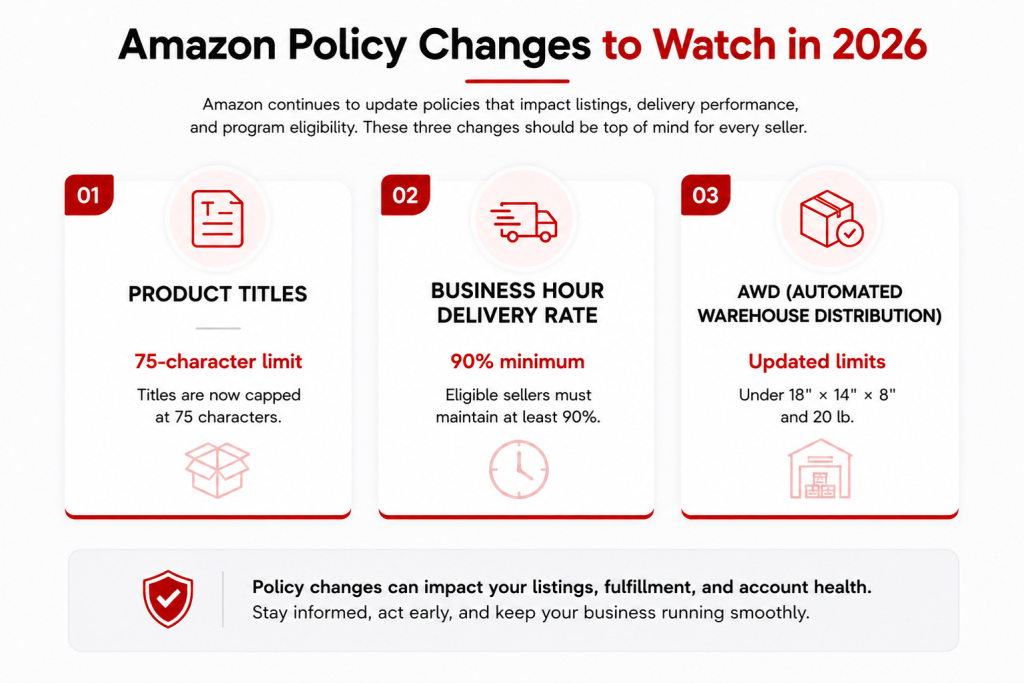
Amazon Policy Changes Sellers Should Watch in 2026
The 2026 changes reach well beyond Seller Central. They affect how you write listings, ship FBM orders, route inventory and prepare products for FBA.
Product Titles Are Now Limited to 75 Characters
Since July 27, 2026, product titles in all categories except media must be 75 characters or fewer, including spaces. To make up for the lost space, Amazon added a searchable Item Highlights attribute of up to 125 characters, shown alongside the title in search results and on product detail pages. That gives you up to 200 characters across the two fields.
Titles still over the limit are gradually rewritten by Amazon’s AI recommendations, so sellers who don’t act lose control over their own wording. Keep brand, product type and the key differentiator in the title, and move materials, features and use cases to Item Highlights. Moving a restricted claim into Item Highlights does not make it compliant.
For large catalogs, this means more than rewriting titles. Teams may need to:
- review existing product titles
- update listing templates
- revise product feeds
- check marketplace integrations
- map content into the Item Highlights field
If product data reaches Amazon through an API, ERP, PIM, feed manager or marketplace integration, review those systems too.
Business Hour Delivery Rate Requirements for FBM
Since September 30, 2026, applicable sellers must maintain a Business Hour Delivery Rate of at least 90% on seller-fulfilled Amazon Business orders shipped to commercial addresses. The metric measures whether shipments arrive on the first attempt and during the customer’s business hours.
Amazon calculates it over a rolling 14-day period. If the rate stays below 90%, Amazon may deactivate affected FBM offers for Amazon Business customers. FBA offers are not affected.
FBM sellers should review:
- handling times
- warehouse cut-off times
- carrier performance
- shipping methods
- commercial-address delivery patterns
- shipping settings
This is a clear example of a policy update turning into a warehouse and carrier-management issue.
Amazon Warehousing and Distribution Eligibility Has Narrowed
Since July 31, 2026, Amazon Warehousing and Distribution (AWD) accepts only sortable products smaller than 18″ × 14″ × 8″ and under 20 lb. Larger or heavier products must go directly into Amazon’s fulfillment network through Send to Amazon.
For sellers using AWD, this affects:
- where inventory is stored
- which products qualify for upstream storage
- replenishment planning
- inbound shipment routing
- allocation between Amazon and third-party warehouses
Accurate inventory visibility matters more than ever, especially when you combine FBA, FBM, Amazon warehousing and external 3PL storage.
Amazon No Longer Preps or Labels FBA Inventory
As of January 1, 2026, Amazon stopped offering its FBA prep and labeling services. Inventory must now arrive at fulfillment centers already prepped, bagged and labeled to Amazon’s requirements, or it risks inbound defect fees and rejected shipments.
Many sellers now route inventory through an Amazon FBA prep center before it ships to Amazon.
Higher FBA Costs and Stricter Inventory Rules
Amazon raised several FBA fees in 2026, including a 3.5% fuel and logistics surcharge on fulfillment fees from April 17, 2026. Aged inventory surcharges and low-inventory-level fees were also revised. Check Amazon’s current FBA fee pages before planning replenishment.
Seller Central Is Becoming More AI-Driven
In March 2026, Amazon introduced its Canvas Experience for U.S. sellers. It combines AI-powered chat with seller data, visual analysis and recommended actions inside Seller Central. Sellers can explore performance trends, inventory, stockout risk, storage fees, revenue and other operational data.
Seller Central is moving from displaying information to interpreting it and recommending next steps. That raises the value of accurate, consistent inventory, fulfillment and operational data.
Amazon Policy Compliance Checklist for Your Business
Knowing what changed is half the job. The other half is keeping the basics compliant every day. Use this checklist to review your account.
Seller Account Setup
- Identity verified with a government-issued ID and, where requested, a video call with Amazon
- Two-step verification turned on for every user
- An internationally chargeable credit card on file for subscription fees and other charges
- Accurate tax details, including your business tax ID and state tax registrations
- A dedicated business email, separate from any personal Amazon account
Product Listings
- Titles at 75 characters or fewer, with supporting details in Item Highlights
- A main image on a pure white background, at least 1,000 pixels on the longest side so zoom works
- Descriptions and bullets that cover the key details accurately
- Category-specific rules followed (for example, jewelry listings state the metal type)
- No prohibited claims such as medical or disease claims, unverified “100% natural” statements, or references to Amazon badges like “Amazon’s Choice”
Inventory Management
Amazon’s Inventory Performance Index (IPI) scores how well you manage FBA stock, based on excess inventory, sell-through, stranded inventory and in-stock rates. Fall below Amazon’s threshold, which it can change each quarter, and your storage capacity may be restricted. Check the current threshold in Seller Central and keep a buffer above it.
Monthly storage fees rise from October to December. Inventory that sits too long also triggers the aged inventory surcharge, charged on top of monthly storage. Run the FBA Inventory Age report monthly and remove or liquidate slow stock before it ages into a higher tier.
Shipping and Packaging
- FBA inventory prepped and labeled before it arrives at Amazon
- Poly bags at least 1.5 mil thick, transparent, with a suffocation warning where required and scannable barcodes
- Standard shipping boxes no larger than 25 inches on any side and no heavier than 50 lb, unless the item is oversized
- Sturdy boxes with intact flaps
- Tracking numbers and carrier names confirmed for every seller-fulfilled shipment, whether through Seller Central, feeds, APIs or integrators
- International shipments that follow each destination’s rules and size limits
Customer Service
- Refunds issued within two business days of receiving a return
- Returns accepted within Amazon’s standard 30-day window, or the extended holiday window when it applies
- Buyer messages limited to order and customer-service issues, with no promotions and no requests for positive reviews
- Review requests sent only through Amazon’s tools, within 5 to 30 days of delivery
- Feedback checked daily and answered professionally
Pricing
Price products to cover product cost, FBA fees, software and your target margin. Follow Amazon’s Fair Pricing Policy. Prices that are significantly higher than recent prices on or off Amazon can lose the Buy Box or be suppressed.
Fix pricing errors quickly by setting minimum and maximum prices in Seller Central. Deals and coupons have their own eligibility rules, typically a sales history and a minimum star rating. Lightning Deals also carry unit commitments, time slots and Prime eligibility requirements.
Account Health Metrics
Check your Account Health dashboard daily so you catch red flags early.
| Metric | Amazon target | What counts against you |
| Order Defect Rate (ODR) | Under 1% | Negative feedback, A-to-z claims, chargebacks |
| Late Shipment Rate | Under 4% | Seller-fulfilled orders confirmed after the expected ship date |
| Pre-fulfillment Cancel Rate | Under 2.5% | Seller-cancelled orders before shipment |
| Valid Tracking Rate | Over 95% | Shipments without valid tracking |
| Business Hour Delivery Rate | 90% or more | Late or failed first-attempt Amazon Business FBM deliveries |
| Policy violations | None | Listing, IP, product safety and other policy warnings |
Business Documents
- Supplier invoices from the past 365 days showing supplier details, matching addresses and payment records
- Manufacturer or distributor documentation that proves authenticity and matches your Seller Central information
- Commercial general liability insurance of at least $1,000,000 once you cross Amazon’s sales threshold, with Amazon named as additional insured
- Business license, bank statements and utility bills ready for account verification
- Records of everyone with Seller Central access, such as contracts and termination letters for employees, contractors and agencies
Product Safety and Compliance Documents
Many categories require proof of safety before a product can stay live. Requirements vary by category, so check the rules for each product type.
| Document | When you need it |
| Children’s Product Certificate (CPC) | Products designed for children 12 and under; based on testing at a CPSC-accepted lab |
| General Certificate of Conformity (GCC) | Many regulated non-children’s products; lists product details, test dates and locations, and manufacturer or importer contacts |
| Lab test reports (ISO/IEC 17025-accredited lab) | Proof the product meets the applicable safety standards |
| Safety Data Sheets (SDS) | Products with chemicals or hazardous materials; covers composition, hazards and handling |
| FCC authorization | Electronics that emit radio frequency |
| FDA-related documentation | Food, cosmetics and medical devices; ingredients and safety information |
| Tracking labels | Children’s products; manufacture date, location and batch number |
Products containing chemicals also need correct hazmat labels and handling instructions. Keep test reports, certificates and specifications organized in one place, and watch for expiry dates.
Submitting Compliance Documents in Seller Central
- Go to Performance > Account Health and open Product Compliance Requests, or use the Manage Your Compliance dashboard.
- Upload the requested files and add notes that explain each document.
- For many ASINs, use the bulk upload option with a spreadsheet of ASINs and compliance details.
- Track status on the dashboard. Reviews usually take a few business days, and Amazon alerts you when documents need renewing.
Appealing a Compliance Action
If a listing is removed or your account is flagged, respond quickly through the Account Health dashboard.
- Gather test reports, certificates, invoices and relevant customer messages in one folder first.
- Write a plan of action in clear business language: the root cause, what you fixed, and how you will prevent it from happening again.
- Check the appeal status in Seller Central daily, and follow up if you hear nothing within about a week.
Why Amazon Policy Changes Affect Warehouse Operations
Amazon policy changes usually start in Seller Central, but their impact often lands in physical operations.
A listing rule may require new product data. A delivery metric can change warehouse cut-off times and carrier selection. A warehousing eligibility change alters inventory routing. An FBA prep requirement affects packaging, labeling and inbound shipments. Policy monitoring therefore shouldn’t sit only with the marketplace manager.
Depending on the update, teams may need to coordinate across:
- inventory management
- FBA preparation
- FBM fulfillment
- warehouse operations
- carrier management
- product data
- internal SOPs
- system integrations
What to Do After an Amazon Policy Update
A repeatable process makes every change easier to manage.
- Verify the official requirement. Check Amazon’s original documentation and confirm the effective date, marketplace, affected program, seller type, product categories and any performance threshold.
- Identify affected products and workflows. Check whether the change touches ASINs, listings, FBA inventory, FBM orders, packaging, labeling, inbound shipments, shipping settings or account-health metrics.
- Update internal procedures. If fulfillment is affected, update warehouse SOPs before the effective date so teams know exactly which products, orders or processes change.
- Review integrations and automations. If Amazon data flows into a CRM, ERP, OMS, WMS or 3PL platform, confirm the integration still supports the new workflow. New product fields or shipping rules may need data-mapping or order-rule updates.
- Monitor results. After rollout, review order status, inventory accuracy, delivery performance, shipment exceptions, listing errors and account health. This catches problems before they spread.
FBA and FBM Sellers May Need Different Responses
Amazon policy changes don’t always affect FBA and FBM sellers the same way.
With FBA, Amazon handles most outbound fulfillment. Sellers remain responsible for inventory planning, product preparation, inbound shipments, labeling, compliance and account management. Since Amazon ended its own prep and labeling services in 2026, that preparation work now sits entirely with the seller or their prep partner.
With FBM, sellers control much more of the process: handling times, pick and pack, shipping methods, carrier selection, tracking, delivery performance and customer delivery expectations.
The Business Hour Delivery Rate shows the difference clearly. It applies to qualifying seller-fulfilled Amazon Business shipments, while FBA offers are unaffected. For FBM sellers, warehouse and carrier performance directly affect marketplace eligibility.
Why Connected Amazon and Warehouse Data Matters
For growing Amazon sellers, the marketplace and the warehouse shouldn’t run as separate systems. Orders, inventory, shipment status, product information and fulfillment instructions all move between teams and platforms. When that depends on manual entry, policy changes are hard to apply consistently.
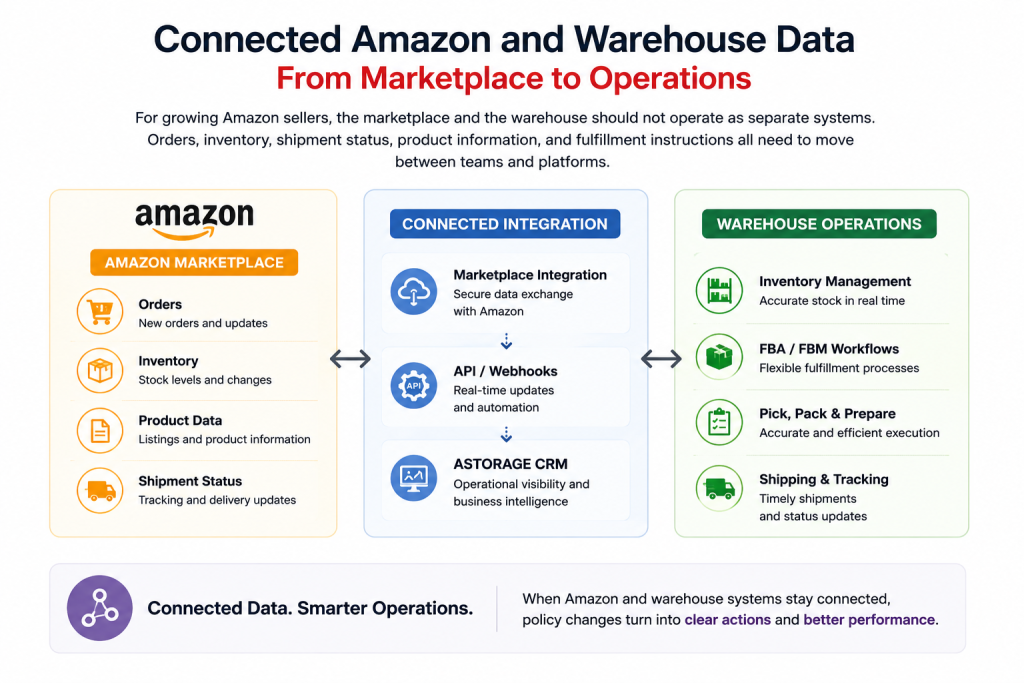
Amazon and Warehouse Integration
ASTORAGEHUB supports Amazon FBA and FBM workflows through Amazon and marketplace integrations that connect Amazon activity with fulfillment operations. Depending on the workflow, integration can help with:
- automated order creation
- inventory synchronization
- shipment-status updates
- FBA and FBM workflow management
- product-data exchange
- less manual data entry
ASTORAGEHUB Platform
The ASTORAGEHUB Platform gives operational visibility into products, inventory, inbound shipments, orders, fulfillment activity, documents, reporting and billing. When a policy affects a specific group of orders, products or shipments, teams can find those workflows quickly instead of relying only on marketplace notifications.
API and Webhook Connectivity
For companies running an ERP, OMS, ecommerce platform or custom software, the ASTORAGEHUB API adds another layer of automation:
- automated order submission
- inventory synchronization
- shipment updates
- product management
- reporting
- webhook notifications
This is especially useful for brands selling across Amazon, Shopify, WooCommerce and other channels.
Technology Does Not Replace Policy Monitoring
Technology helps execute operational changes, but it doesn’t replace Amazon’s policies or Seller Central. Sellers still need to decide what a policy requires and whether it applies to them. Once that’s clear, connected systems apply the change consistently across inventory, orders, fulfillment and warehouse operations.
Build a Simple Amazon Policy and Compliance Routine
You don’t need to check every Amazon page every day. A recurring routine is usually enough.
| How often | What to check |
| Daily | Seller Central notifications, Account Health dashboard, buyer messages and feedback |
| Weekly | Changes to Program Policies, Seller Forums announcements, Product Compliance Requests, late shipment and cancel rates |
| Monthly | IPI score, FBA Inventory Age report, aged and stranded inventory, listing errors, pricing alerts |
| Quarterly | Full run of the compliance checklist above, insurance and document expiry dates, Seller Central user access |
| After every policy update | Document the change and effective date, identify affected SKUs, update warehouse SOPs, review integrations, monitor results |
The objective is to turn policy monitoring into a normal operational process rather than reacting only when a problem appears.
Amazon Seller Policy and Compliance FAQ
Amazon publishes updates through Seller Central notifications, the Changes to Program Policies page, Account Health, program-specific help pages, official announcements and the Seller Forums.
There’s no fixed schedule. Changes arrive throughout the year across listings, fulfillment, seller performance, fees, inventory programs and marketplace requirements.
Not always. Some changes apply to all sellers, while others apply only to FBA, FBM, Amazon Business, certain categories or specific marketplaces.
Since July 27, 2026, titles in all categories except media must be 75 characters or fewer, including spaces. A separate Item Highlights field holds up to 125 more searchable characters.
It measures the share of qualifying Amazon Business FBM shipments delivered on the first attempt and during the customer’s business hours. Since September 30, 2026, affected sellers must keep it at 90% or higher.
No. Amazon ended its FBA prep and labeling services on January 1, 2026. Sellers must prep and label inventory themselves or use a third-party prep center.
The main targets are an Order Defect Rate under 1%, a Late Shipment Rate under 4%, a Pre-fulfillment Cancel Rate under 2.5% and a Valid Tracking Rate above 95%, with no unresolved policy violations.
Keep recent supplier invoices, proof of authenticity, liability insurance once you pass Amazon’s sales threshold, business verification documents and any category-specific safety certificates, such as a CPC for children’s products.
Review the official documentation, identify affected products and workflows, update internal procedures, review integrations, brief operations teams and monitor performance after rollout.
Yes, operationally. Integrations keep order, inventory, shipment and warehouse data in sync once you know what a policy requires. They don’t replace compliance monitoring.
Keep Your Amazon Operations Ready for Change
Amazon policy updates are a normal part of selling on the marketplace. The sellers who handle them best don’t just follow Amazon news. They understand how each change affects listings, inventory, fulfillment, shipping and warehouse execution, and they keep the compliance basics in order every day.
For businesses running Amazon FBA, FBM or multiple ecommerce channels, connected operational systems make those changes easier to apply consistently. ASTORAGE combines Amazon prep and fulfillment services with CRM visibility, marketplace integrations and API connectivity, helping ecommerce brands connect marketplace activity with warehouse operations. Get a quote to see how we can support your Amazon business.
- Kitting and Bundling: A Guide for Ecommerce Brands
- Cubic Feet vs Pallet Pricing: Which Is Cheaper for Your Inventory?
- How to Calculate Cubic Feet for Warehouse Storage
- FedEx, DHL Express, UPS and USPS 2027 Rate Increases: What Ecommerce Sellers Need to Know
- The Role of the Amazon Transparency Program in Product Authenticity